














« Back to features

Capture Proof. Prevent Disputes.

Collect photos, signatures, notes, and geo-stamped confirmations for every order. Protect your team and your bottom line.

“Overall it's a great product with first class support and assistance.”

Proof of Delivery

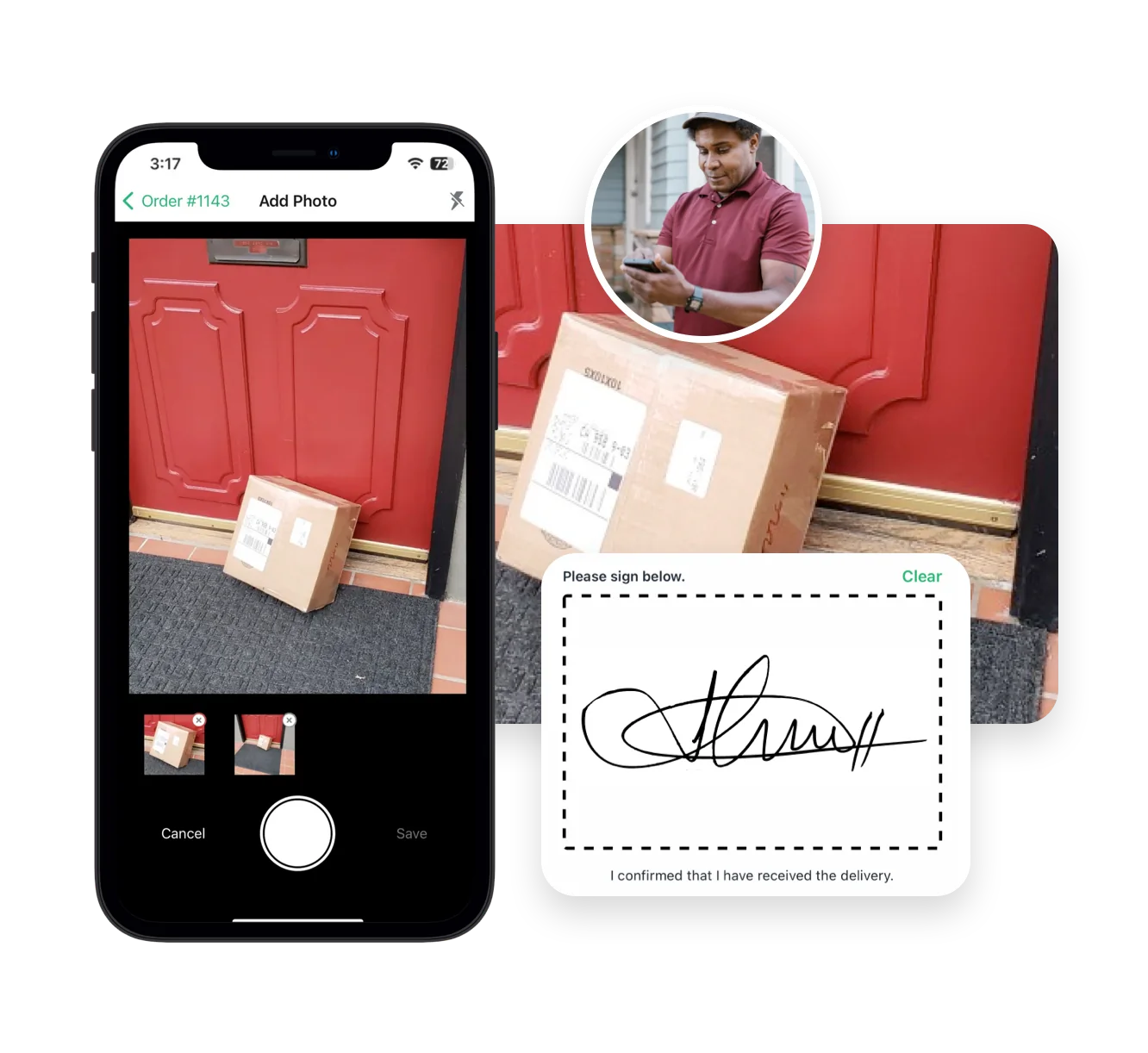
EasyRoutes’ proof of delivery tools provide clear, verifiable confirmation that deliveries or pickups were completed successfully—helping businesses prevent disputes, improve accountability, and maintain customer trust. Drivers can easily capture electronic signatures, take photos, scan barcodes, and add notes directly within EasyRoutes' mobile app, automatically syncing these items to their corresponding order and route.

These detailed delivery records support compliance with industry requirements, reduce time spent resolving customer inquiries, and provide clarity for high-value or regulated shipments. For teams managing multiple drivers or broad delivery zones, these tools ensure every stop is properly documented, helping operations run smoothly while giving customers peace of mind with real-time tracking and delivery confirmations.

Capture Proof. Prevent Disputes.
Collect photos and eSignatures to automatically share with customers for every successful stop
Scan a barcode for each stop, ensuring the correct items land on every doorstep
Retain all proof of delivery for future reference and easy resolution of customer disputes
⭐⭐⭐⭐⭐ 4.9 stars Trusted by 5,000+ Businesses

Flower Delivery: The Million RosesMattress Delivery: SonnoPizza Delivery: SliceGass Delivery: Gas GuysFood Delivery: Redstart FoodsBread Delivery: Butter & Crust
Real-time Driver Tracking

Real-time Driver Tracking

See every active route in real time. Share accurate ETAs with customers, monitor team performance, and ensure deliveries stay on schedule.
Activity Feed

Activity Feed

Get a timeline of every delivery event — from route creation to completion. Spot delays, monitor accountability, and respond faster to issues.
Optimized Route Planning

Optimized Route Planning

Automatically generate efficient, cost-saving routes using real-time traffic, delivery windows, and order priorities—then edit on the fly.

Frequently asked questions

What types of proof of delivery can EasyRoutes capture?

EasyRoutes supports delivery photos, e‑signature, driver notes, and automatic timestamps (with GPS location when available) to provide a complete delivery record.

See: Proof of Delivery

How many photos can be attached to a stop?

You can attach up to four delivery photos per stop, plus an e‑signature and driver notes, to document each delivery thoroughly.

See: Proof of Delivery

Can drivers upload proof from their phone gallery?

Yes. If enabled in Driver Settings, drivers can upload photos from the device gallery — handy for low‑connectivity deliveries — then the app syncs them when online.

See: Uploading from Gallery

Can I add proof of delivery manually from my web browser?

Yes. Admins can upload photos and notes directly to a stop from the browser if something couldn’t be captured from a mobile device.

See: Manual Upload

Can I make proof of delivery mandatory?

Yes. Require photos, e‑signature, and or a driver note individually before a stop can be marked Delivered or Attempted in the driver app.

See: Mandatory PoD

Can I share proof of delivery through tracking links?

Yes. You can show proof of delivery (photos, e‑signature confirmation, and driver notes) on customer tracking pages for delivered or attempted stops. Enable this from EasyRoutes' Order Tracking settings.

See: Proof of Delivery · Order Tracking Pages

Is e-signature displayed to customers?

Tracking pages show that a signature was collected and when; for security purposes, the actual signature image isn’t displayed publicly but is retained internally for reference.

See: Proof of Delivery

Can I include proof in Shopify notifications?

Yes. Add PoD image URLs to Shopify’s Delivered/Missed templates so customers receive photo links in standard Shopify emails.

See: Use PoD in Shopify Notifications

Can proof of delivery be exported for records?

Yes. Export routes/stops to CSV to get timestamps and URLs to proof items for archiving or analysis. Pair with Analytics for summary trends.

See: Export Proof of Delivery · Export routes/stops

Are proof-of-delivery captures geo-stamped / GPS-tagged?

Yes. With location capture enabled, each proof-of-delivery entry is recorded with the driver’s GPS location and a timestamp. See: Proof of Delivery

Are barcode scans recorded in the proof-of-delivery log?

Yes. Scans are stored with the stop’s proof of delivery for live or later review, and can be included when you export stop data. See: Proof of Delivery