














« Back to features

Track Every Driver. Live

See every active route in real time. Share accurate ETAs with customers, monitor team performance, and ensure deliveries stay on schedule.

“We've tried a few routing apps over the last couple of years and EasyRoutes has been by far the best.”

Real-time Driver Tracking

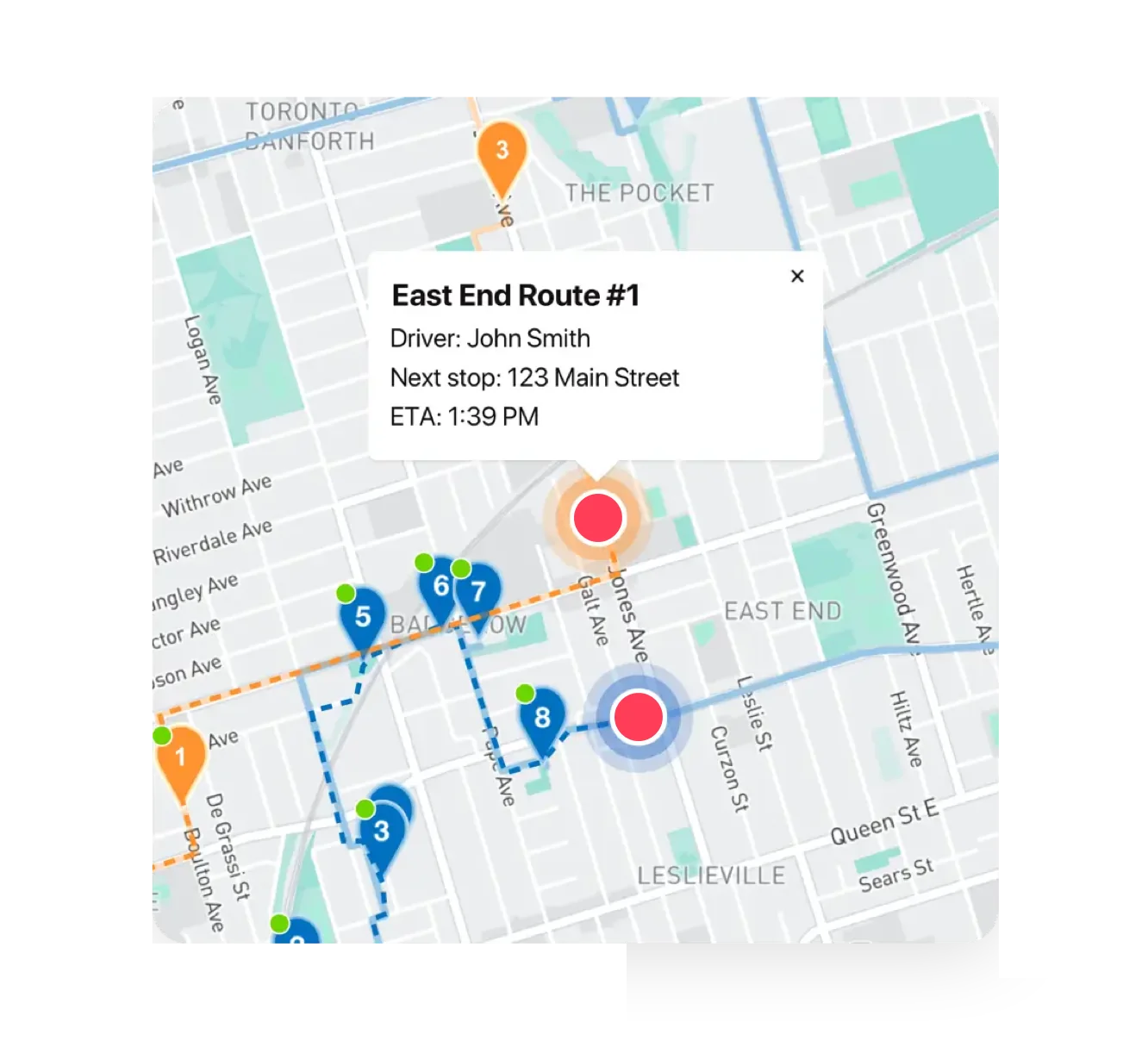
EasyRoutes’ real-time driver tracking gives businesses full visibility into their delivery operations, making it easier to manage routes, respond to unexpected delays, and keep customers informed. By displaying live driver locations, stop progress, and accurate ETAs, businesses can make smarter dispatching decisions and quickly adapt to last-minute changes.

Customers benefit from real-time updates and notifications that show when their delivery is just a few stops away—eliminating uncertainty and enhancing satisfaction. Internally, teams spend less time fielding “Where is my order?” inquiries and more time focusing on proactive problem-solving. With tracking data synced to each order and route, businesses improve transparency and control across every stage of the delivery journey.

Track Every Driver. Live
Get instant updates on driver location for better response times
Maintain full visibility of your delivery network, no matter the size or complexity
Improve fleet efficiency by continuously monitoring driver progress
⭐⭐⭐⭐⭐ 4.9 stars Trusted by 5,000+ Businesses

Flower Delivery: The Million RosesMattress Delivery: SonnoPizza Delivery: SliceGass Delivery: Gas GuysFood Delivery: Redstart FoodsBread Delivery: Butter & Crust
API & Zapier Automations

API & Zapier Automations

Use the EasyRoutes API and Zapier to automate order imports, route creation, dispatch, and delivery status updates — connecting your operations to the tools you already use.
Notifications & Tracking

Notifications & Tracking

Send branded delivery notifications and live tracking links. Reduce "Where's my order?" calls and improve the customer experience with every stop.
Order Sync

Order Sync

Bring orders into EasyRoutes from Shopify, spreadsheets, Zapier, or the API — and add custom stops anytime. One system for every delivery.

Frequently asked questions

Can I track my drivers in real-time?

Yes. Enable Real‑Time Tracking in Settings → Driver settings (Premium/Enterprise subscription plans) to view live driver location and progress in the Tracking tab of any route.

See: Real‑Time Tracking

What information can I see in real-time tracking as an admin?

The route’s Tracking tab shows live driver location, recent path, next/current stop, and real‑time stop status, completion times, and proof of delivery events.

See: Real-Time Driver Location Tracking · Activity Feed

How do I enable real-time driver tracking in EasyRoutes?

Go to your EasyRoutes Settings → Driver settings, and enable real‑time tracking. Have drivers allow location Always + Precise location in the EasyRoutes Delivery Driver app and their mobile device's settings.

See: Real-Time Driver Location Tracking

What permissions do drivers need to enable tracking?

Drivers must grant Always (iOS) / Allow all the time (Android) location access and enable Precise location. Background location must remain on for the EasyRoutes Delivery Driver app.

See: Real-Time Driver Location Tracking

Does tracking continue if the driver closes the app?

Yes — provided background location is configured as allowed (Always/Allow all the time) and the OS isn’t restricting the app. Force‑quitting or disabling location will pause updates until the app is reopened.

See: Real-Time Driver Location Tracking

Can I require drivers to start a route before tracking begins?

Yes. Require drivers to tap Start Delivery before updating stops so tracking begins at the official route start and overall drive time is captured accurately.

See: Real-Time Driver Location Tracking · Driver Settings

Can I troubleshoot missing or inaccurate tracking data?

Yes. Confirm the route is started, location is set to Always/Precise, battery saver is off, and the app is up to date. If needed, reopen the app to resume tracking.

See: Real-Time Driver Location Tracking

Can I track multiple routes at once?

Yes. Open a Route Group to view multiple live driver locations and statuses on one screen; each driver pin is colour‑coded by route.

See: Real-Time Driver Location Tracking · Route Groups

Can I hide driver location from customers?

Yes. Live driver location on tracking pages is optional - keep it internal or show it to customers when their driver is 1–10 stops away.

See: Real‑time Driver Location