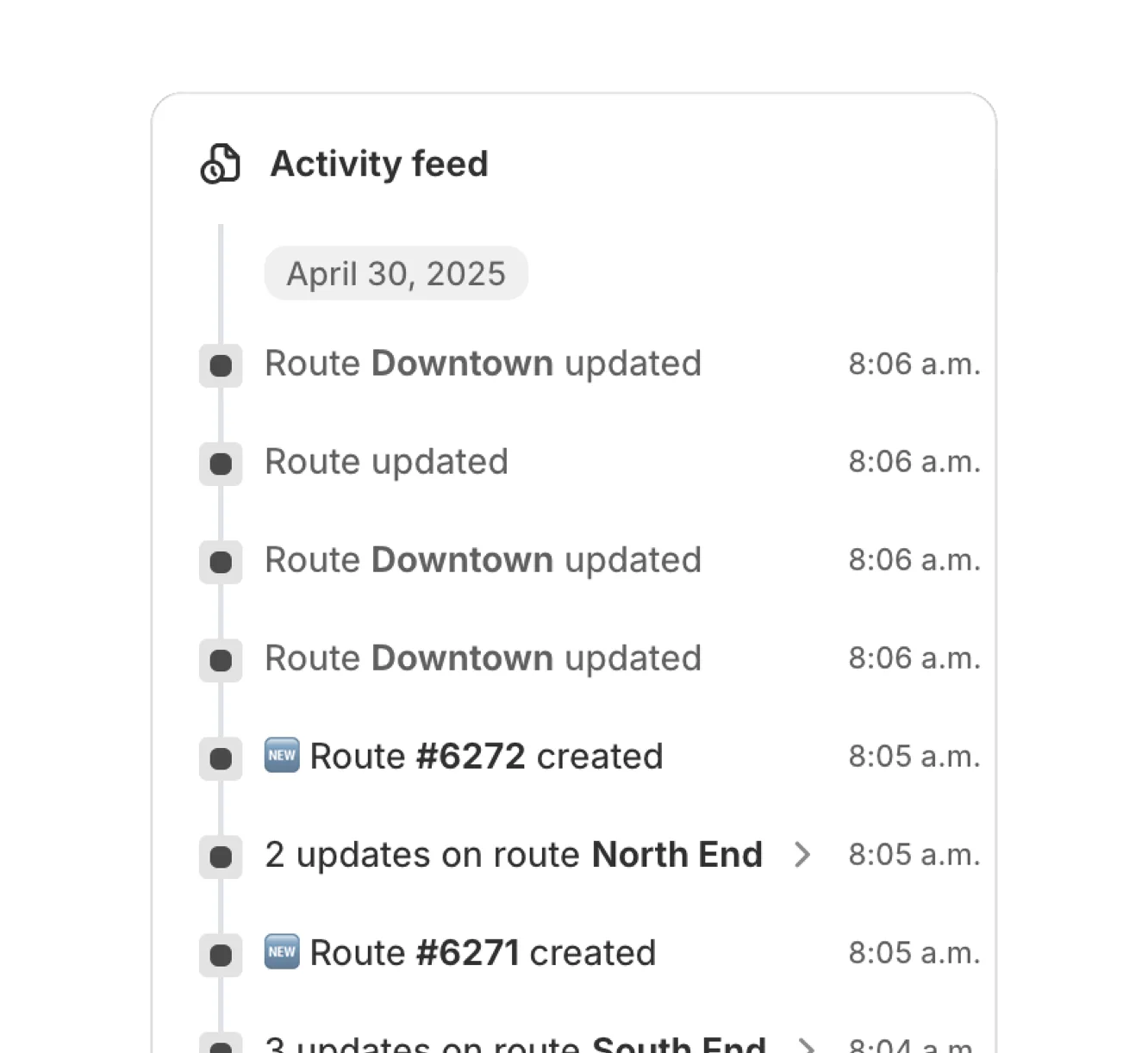















Get a timeline of every delivery event — from route creation to completion. Spot delays, monitor accountability, and respond faster to issues.

Without clear visibility into delivery operations, it’s easy to miss critical updates or overlook errors. EasyRoutes’ activity feed provides a centralized audit log for your entire delivery workflow, helping teams stay aligned and accountable. Monitor route progress across your operation or drill down into specific stops and deliveries.
Every activity is tied to a user or team member and includes timestamps, IP addresses, and device info - giving you the tools to audit actions, resolve issues quickly, and drive operational transparency. With this insight, businesses can deliver more efficiently, keep customers informed, and foster team accountability.


The Activity Feed is a real‑time, account‑wide log of route, stop, and driver events (e.g., dispatches, status changes, proof of delivery).
See: Activity Feed
Events include route creation/updates, dispatch, driver assignments, stop status changes (Out for Delivery/Delivered/Attempted), and proof‑of‑delivery uploads.
See: Activity Feed Events
Yes. The feed offers a timestamped, user‑attributed history of delivery events you can reference alongside CSV exports for formal audits.
See: Activity Feed · Export routes/stops
Activity Feed data is retained for the lifetime of your EasyRoutes account unless it’s removed as part of data deletion. Use route/stop exports when you need a file copy.
See: Activity Feed
No. The feed is visible to admin/dispatcher roles in the web app; drivers see only their assigned routes in the mobile app.
See: Activity Feed
Not directly, as the Activity Feed is intended as a real-time stream of events for quick reference and attribution. Export related route/stop data (with timestamps and PoD links) to CSV for analysis or records.
See: Export routes/stops · Activity Feed
You can scope the feed: the Dashboard shows all activity, while a route’s or Route Group’s feed shows only its events. Entries are chronological, expandable for detail, and clickable to jump to the route. See: Activity Feed
Yes, when available. Expanding an entry shows who initiated it (email/Shopify user ID or driver name) plus the IP address and device details captured for that action. See: Activity Feed