
We've added a number of new settings to fine-tune what route information appears in the Dashboard when opening EasyRoutes. Update Dashboard customization options from your EasyRoutes Settings > General tab, within the Dashboard page options section:
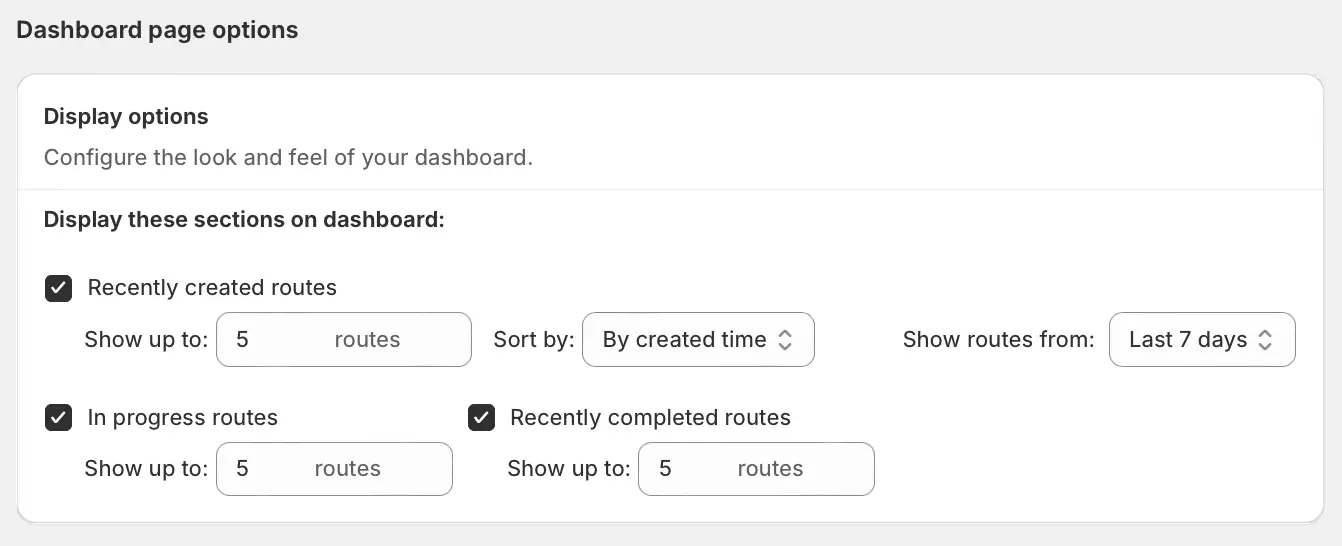
- Use the checkboxes to disable any sections that are not required. By default, all three sections will be enabled.
- Use the Show up to boxes to increase or decrease how many routes are shown within each section. By default, each section will display 5 routes, but can be configured to display anywhere from 1 to 15 routes.
- Use the Sort by dropdown to set the order routes will be sorted in all sections - choose from By start time (latest scheduled calendar date/time on top), By created time (most recently created on top), or By last modified time (most recently modified on top). By default, routes will be sorted By created time.
- Use the Show routes from dropdown to select how far back in time to fetch routes from - choose from increasing intervals from Last 0 days (i.e. within the current day) to Last 90 days. By default, routes will be fetched from Last 7 days.