How to Choose Delivery Routing Software (2026 Guide)
By Joe SnyderA practical 2026 guide to choosing delivery routing software: the features that matter, what it costs, and how to match a route planner to your needs.

A practical 2026 guide to choosing delivery routing software: the features that matter, what it costs, and how to match a route planner to your needs.
Every route planner on the market claims to be the best one for small and medium businesses. Some promise the cheapest plan, others the slickest app or the most powerful optimization engine. The marketing noise makes a genuinely important decision harder than it should be, because the real question isn’t which tool is “best” in the abstract — it’s which one fits the way your delivery operation actually works.
That decision matters more than it used to. The final leg of getting an order to a customer’s door has quietly become the most expensive part of the journey: last-mile delivery now accounts for roughly 53% of total shipping costs, up from 41% in 2018. When the costliest, most visible part of fulfillment is also the part you control directly, the software you use to plan and run it is no small choice.
This guide walks through what delivery routing software does, why manual planning eventually breaks, the questions to ask before you commit, and the features that actually move the needle — so you can choose with confidence instead of guesswork.

At its core, delivery routing software automates the creation of efficient, multi-stop delivery routes. Instead of plotting dozens of addresses on a map by hand, you feed in your orders and the software calculates the fastest, most practical sequence based on delivery windows, traffic, vehicle capacity, and driver availability. The goal is simple: less time driving, more deliveries completed, and fewer surprises along the way.
But a modern route planning app is more than a map tool. The good ones bundle order tracking, automated customer notifications, a driver-facing mobile app, proof of delivery, and reporting into one system that keeps dispatchers, drivers, and customers in sync in real time. That breadth is why the category is growing so quickly — the global route optimization software market reached about $9.6 billion in 2024 and is projected to hit $21.46 billion by 2030, a sign of how many businesses are moving away from doing this by hand.

Pen and paper, or a shared spreadsheet, can carry a young delivery operation surprisingly far. The trouble starts when volume climbs and customers begin expecting live updates. Manual planning is slow to build, error-prone, and nearly impossible to adjust on the fly when a road closes or an order comes in late.
Consider a business with 40 stops spread across several zones. Sequencing that route by hand can eat an hour or more — before a single “where’s my order?” call comes in. Every inefficient mile adds fuel cost and pushes back the last delivery of the day. As the operation grows, those small inefficiencies compound into overtime, missed windows, and frustrated customers. If you’re routinely spending more than half an hour a day building routes, that’s usually the signal it’s time to weigh switching from manual planning to software.
Before you compare feature lists, get clear on your own requirements. A handful of honest questions will sharpen the picture quickly:
Answering these gives you a buyer’s checklist grounded in your reality rather than a vendor’s pitch. With that in hand, the feature comparison becomes far more useful.
Plenty of platforms try to dazzle with long feature lists, but a focused set of capabilities does the heavy lifting for most delivery businesses. Here’s what to look for, and why each one earns its place.
This is the engine of the whole product. Strong route optimization covers a wide spread of addresses while cutting fuel and labor, and it handles complex, volatile operations without sacrificing efficiency. Speed counts too — a capable planner should optimize a route in seconds, not minutes, and let you re-optimize when plans change. The better the algorithm, the more your same team can deliver in a day.
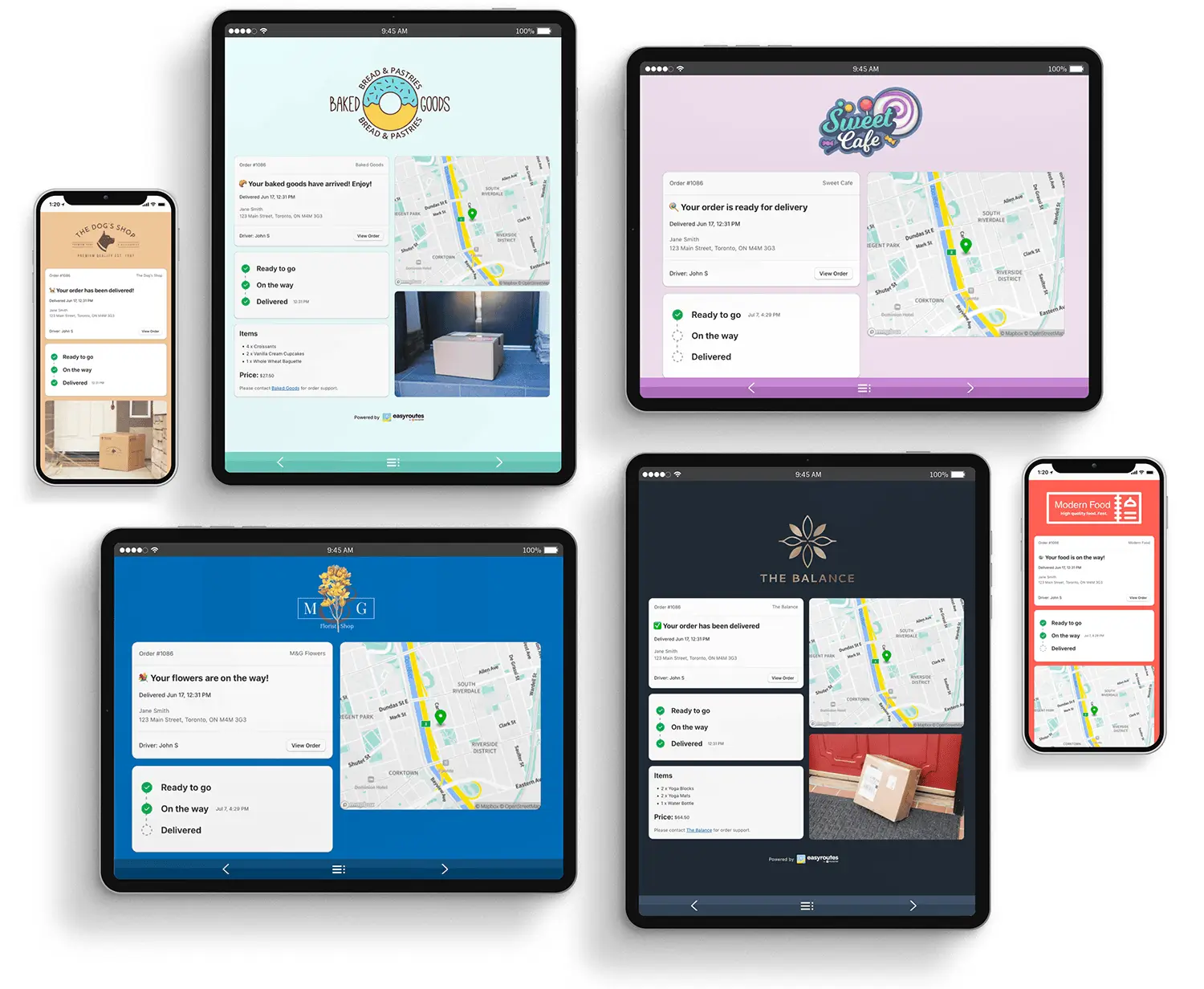
Once routes are running, you need visibility. Real-time GPS tracking shows where drivers are, surfaces delays before they become problems, and lets you give customers dependable arrival times. That reliability isn’t cosmetic: in a 2025 survey, 85% of consumers said they would never shop with a brand again after a poor delivery experience. Accurate ETAs are how you stay on the right side of that statistic.
Timely text and email updates keep customers informed and dramatically cut the volume of status-check calls. They also reduce failed deliveries by nudging someone to be home at the right time. The impact reaches earlier than you might think — shoppers say estimated delivery dates influence their purchase decisions, and when no delivery date is shown at checkout, 40% won’t complete the order at all.
Your drivers live in the mobile app, so it has to be genuinely usable on the road. Look for turn-by-turn navigation, the ability to update order status, and built-in proof of delivery — photo capture and e-signature — so every drop-off is documented. Proof of delivery protects you against disputes and gives customers reassurance their order arrived.
One of the biggest practical differentiators is whether the software plugs directly into where your orders already live. A tool integrated with your store means orders flow in automatically, ready to route, and status updates sync back without manual exports and imports. Every spreadsheet you don’t have to wrangle is time returned to your day.

Choose a planner that grows with you. It should create multiple routes for multiple drivers, balance stops evenly across them, and respect real-world constraints like vehicle capacity and delivery windows. A platform that learns from your live operations rather than leaning on pre-compiled data will keep serving you well as you add drivers and territory. For a deeper look at the mechanics, our guide to multi-stop route planning breaks down how the best tools handle complexity.
You can’t improve what you can’t measure. Reporting on delivery times, planned-versus-actual routes, mileage, and driver performance turns daily operations into data you can act on — spotting bottlenecks, refining future routes, and making smarter staffing and vehicle decisions.
A powerful tool that nobody can figure out is worse than a simple one your team actually adopts. The software should require little training, work without buying new hardware, and come with clear tutorials and guidance. Quick onboarding means the value shows up in days, not weeks.
When a route goes sideways at 9 a.m., you need help fast. Prioritize providers offering easy, multi-channel support — email, phone, and live chat — so a hiccup never becomes a lost delivery. Strong support is the safety net that lets you get the most out of every other feature.

It’s tempting to shop on the monthly subscription price alone, but that’s the wrong anchor. The better question is what manual planning is already costing you in hours, overtime, wasted fuel, and fielding delivery-status messages. Measured against that, a capable platform often pays for itself within weeks.
The right tool doesn’t just trim miles; it lets you serve more customers in less time, which grows revenue without growing stress. When you evaluate options, look past the sticker price to total value: the labor you reclaim, the deliveries you add, and the customers you keep. A broader delivery management software buying guide can help you frame that return on investment across the full feature set, not just routing.
Once you know your must-have features and how you’ll judge value, build a short list and test the top contenders against a real day of your orders. Pay attention to how fast each one optimizes, how your drivers respond to the app, and how cleanly it fits your existing tools. If you’d rather start from a vetted comparison, our roundup of the top route planning tools lays out how the leading platforms stack up so you can skip straight to a focused trial.
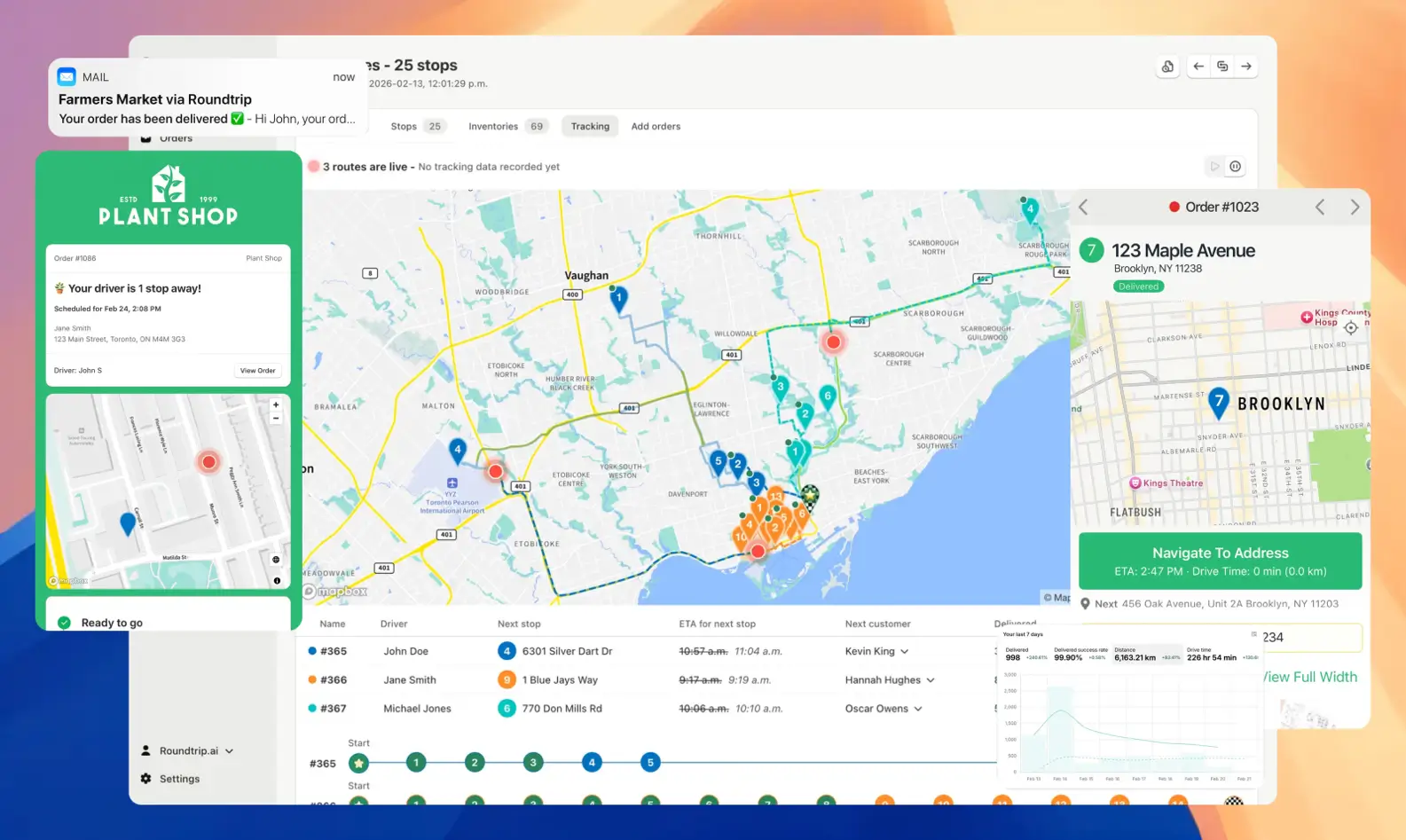
EasyRoutes is purpose-built to make delivery planning smooth and scalable — whether you run a Shopify store or operate entirely outside it. Users on Shopify get a native app that lives directly inside their store, so orders appear ready to route and any change, like marking a stop delivered, syncs back instantly. Everyone else can use the standalone EasyRoutes web app, importing orders from a spreadsheet, entering stops manually, or connecting through the API — no Shopify account required.
However you bring orders in, EasyRoutes turns them into optimized routes in a few clicks, dispatches them to drivers, and sends branded delivery notifications automatically. Its driver app supports live tracking, route updates, and photo or signature proof of delivery, while customers follow along on their own tracking page. It's the same caliber of routing the big couriers use, without the enterprise complexity — and if you're on Shopify, you can see how it's tailored for the platform in our overview of Shopify route planning software.
Choosing delivery routing software isn’t about finding the platform with the longest feature list — it’s about finding the one with the right features for how you deliver. When every mile, every customer message, and every on-time drop-off shapes your margins and your reputation, moving from manual planning to a tool that fits your business is one of the highest-leverage upgrades you can make.
Start with your own requirements, weigh value over price, and put your short list through a real trial. The right choice turns a daily logistical scramble into a quiet, repeatable system — and frees you to focus on growing the business instead of untangling routes.
Turn orders from any source into optimized delivery routes you can share with your drivers or deliver yourself. Learn more at Roundtrip.ai, install the app from the Shopify App Store, or create an account on EasyRoutes' standalone web app to start streamlining your local deliveries with a 14-day free trial today.
EasyRoutes optimizes deliveries using your selected orders, start & end locations, stop time intervals, time windows, and route limits. You can balance routes, respect capacities, and re‑optimize as plans change.
See: Route Options · EasyRoutes 101
Yes. EasyRoutes supports Vehicle Profiles you can configure and assign to routes. EasyRoutes also supports capacity planning via item or weight limits per route. Use these with other options (like time windows, or custom start/end locations) to keep plans realistic and drivers on schedule.
See: Vehicle Profiles · Max items/weight per route · Commercial/GPX Export
Yes. Enable Balance routes to distribute stops as evenly as possible across multiple routes/drivers while respecting other route constraints (like time windows, or item/weight limits).
See: Balance routes · How many routes?
Yes. Enable Real‑Time Tracking in Settings → Driver settings (Premium/Enterprise subscription plans) to view live driver location and progress in the Tracking tab of any route.
See: Real‑Time Tracking
Yes. EasyRoutes Premium and Enterprise plans support branded SMS notifications with usage‑based pricing per message segment. Configure templates and funding in Settings.
ETAs use route distance, stop service times, and historical traffic, and they update during the day as drivers progress. Accuracy improves when addresses and time windows are clean.
EasyRoutes supports delivery photos, e‑signature, driver notes, and automatic timestamps (with GPS location when available) to provide a complete delivery record.
See: Proof of Delivery
Yes. New and updated Shopify orders flow into EasyRoutes automatically so your Orders page stays current for planning. If something looks off, refresh and check your date/location filters.
Delivery Analytics shows totals and trends for stops and routes, including completed vs. missed deliveries, average delivery time, per‑driver performance, and route metrics over a chosen period.
See: Delivery Analytics
Pricing is based on plan tier plus the number of driver seats in your subscription; optional SMS is usage‑based. Scale seats up/down anytime.
See: Pricing · Pricing & Plans FAQ
Yes. EasyRoutes for Shopify and EasyRoutes for Web include a 14‑day free trial on any tier, so you can test our advanced features before subscribing.
See: Plans & Pricing
Most teams connect, fetch orders, and create their first optimized route in under an hour. Follow the Getting Started guide found on the EasyRoutes support portal to reach your “aha” moment fast.
See: Getting Started
EasyRoutes is the AI-native delivery operations platform trusted by 5,000+ businesses across 75+ countries. Plan routes in seconds, dispatch drivers automatically, and delight your customers — from Shopify or any order source. Experience delivery operations that run themselves. Rated 4.9 stars and certified Built for Shopify.
⭐⭐⭐⭐⭐ 4.9 stars • Trusted by 5,000+ Businesses





