Mother’s Day Deliveries: The 2026 Shopify Guide
By Joe SnyderHow florists and Shopify merchants can plan, route, and nail Mother’s Day deliveries with EasyRoutes.

How florists and Shopify merchants can plan, route, and nail Mother’s Day deliveries with EasyRoutes.
Mother’s Day is one of the busiest delivery days on the calendar — and for many Shopify merchants, it’s the single biggest test of their delivery operation all year. U.S. shoppers are expected to spend a record $38 billion on Mother’s Day in 2026, with the average shopper budgeting $284.25 and 84% of adults planning to celebrate. For florists, gift shops, bakeries, and any store that delivers locally, that demand arrives compressed into a frantic few days. This guide pulls together everything you need to plan, route, and deliver a smooth Mother’s Day — and shows how EasyRoutes takes the stress out of the rush.


Mother’s Day consistently ranks among the most lucrative gifting holidays of the year, and the 2026 numbers underscore why preparation pays off. Flowers remain one of the most popular gifts, chosen by 74% of shoppers, with total spending on flowers projected to reach $3.2 billion. Greeting cards, special outings, jewelry, and gift baskets round out the haul — meaning bakeries, chocolatiers, and specialty retailers feel the surge right alongside florists. The floral spike is especially intense for local shops: this past year, 38% of Americans bought flowers or plants for mom — matching a 13-year high — and the average purchase climbed to $71, up from $60 the year before. Local florists also captured a bigger share of those orders than in prior years, a reminder that customers increasingly want to buy from a nearby shop that can actually hand-deliver.
The challenge isn’t demand; it’s timing. According to floral-industry data, Mother’s Day accounts for roughly 26% of all holiday floral transactions, and nearly all of that volume lands in a handful of days. A shop that comfortably fills 30 deliveries on an ordinary week may suddenly need to route 150 in a single morning. When that happens, arrangements take longer than planned, drivers run out of daylight, and a missed delivery on the one day it absolutely had to arrive can cost you a customer for good. Whether you sell bouquets, gift baskets, or chocolates, the businesses that win Mother’s Day are the ones that turn that spike into organized, optimized delivery runs instead of a white-knuckle scramble. If peak periods are a recurring pain point, our guide to managing local deliveries during peak times goes deeper on demand planning.

The single biggest predictor of a smooth Mother’s Day is how much you plan before the orders pour in. A little setup in the weeks beforehand removes almost all of the day-of chaos. A few moves that pay off every year:

Working with extra drivers to cover the holiday? Select your orders, choose how many routes you want to split them into, and EasyRoutes builds multiple optimized routes at once. The Balance Routes feature spreads stops evenly across drivers so no one is overloaded while another finishes early — and it respects your settings for maximum stops, route duration, vehicle capacity, and delivery time windows.
You can fine-tune each run to match how you actually operate. Set custom start and end locations so routes begin at your shop and end wherever a driver needs to finish. Use vehicle profiles and route-level capacity limits — by item count or weight — so a fragile load of arrangements isn’t crammed into one trip. Optimization matters most precisely when volume is highest: a well-sequenced route means fewer miles, less fuel, more deliveries per driver, and tighter ETAs for customers waiting on a Mother’s Day surprise. If you’re routing dozens or hundreds of stops for the first time, our ultimate guide to multi-stop route planning walks through how to do it efficiently.
Last-minute orders are a Mother’s Day certainty — someone always remembers on Saturday night. The good news: you don’t have to rebuild everything from scratch. With EasyRoutes you can click into any route and add orders or custom stops, update an address or service time, reassign a driver or vehicle, and drag-and-drop to adjust the stop order. You can even re-optimize the route after editing so a single late add slots into the most efficient position instead of throwing off the rest of the day.
For florists especially, this flexibility is a quiet superpower. Many Mother’s Day customers are happy to receive flowers any time during the week leading up to the holiday, so promoting a “Mother’s Day Week” of delivery windows lets you spread volume out, absorb late orders, and keep every arrangement fresh on arrival rather than sitting in a hot van for hours.
EasyRoutes integrates directly with Shopify and your orders, so there are no clunky spreadsheet exports to wrestle with. Pull in orders straight from your storefront, from draft orders, or imported from a spreadsheet when you need to, then plan routes using order tags, recurring subscription orders, or pickup orders — all inside the Shopify ecosystem you already use. Powerful filtering lets you slice the day’s orders by tag, location, delivery date, or fulfillment status, so you can route just the Mother’s Day deliveries without sifting through everything else.
That tight integration means the route you build reflects exactly what your customers ordered, and delivery status flows back into Shopify automatically as drivers complete stops. It’s a fit for any merchant who sells and delivers locally through Shopify, from single-van flower shops to multi-driver gift retailers. For a fuller look at how routing fits into a Shopify operation, see our overview of Shopify route planning software.
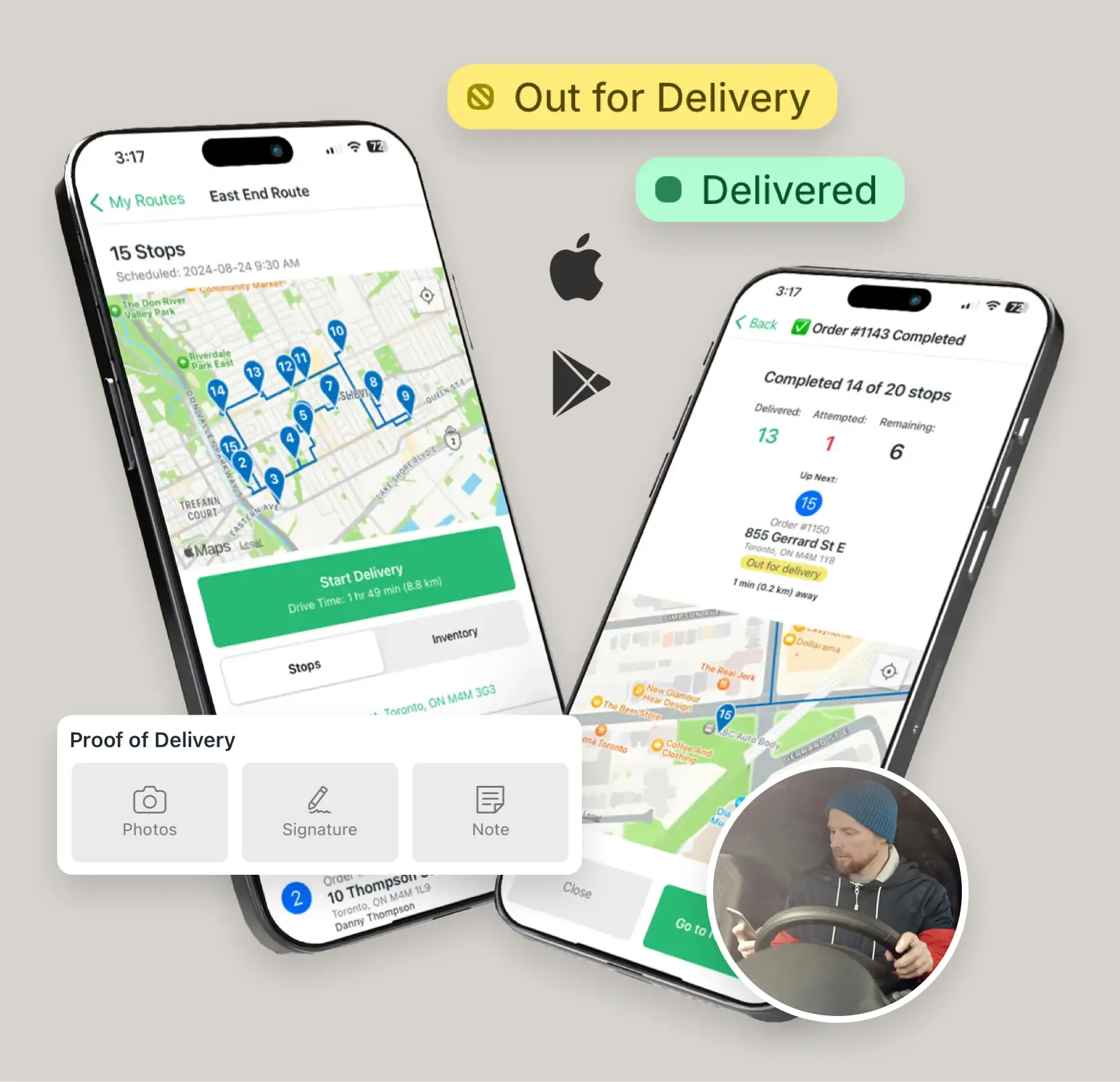
Hiring seasonal drivers for the rush? Dispatch any route to a specific driver, or share a route link that lets your driver pool self-assign. Assigned drivers receive the route in the EasyRoutes Delivery Driver app for iOS and Android, complete with turn-by-turn navigation in their preferred maps app — Google Maps, Apple Maps, or Waze. As they mark orders delivered from the road, your Shopify orders update automatically, so there’s no end-of-day reconciliation and you can see live progress across every route from your desk.
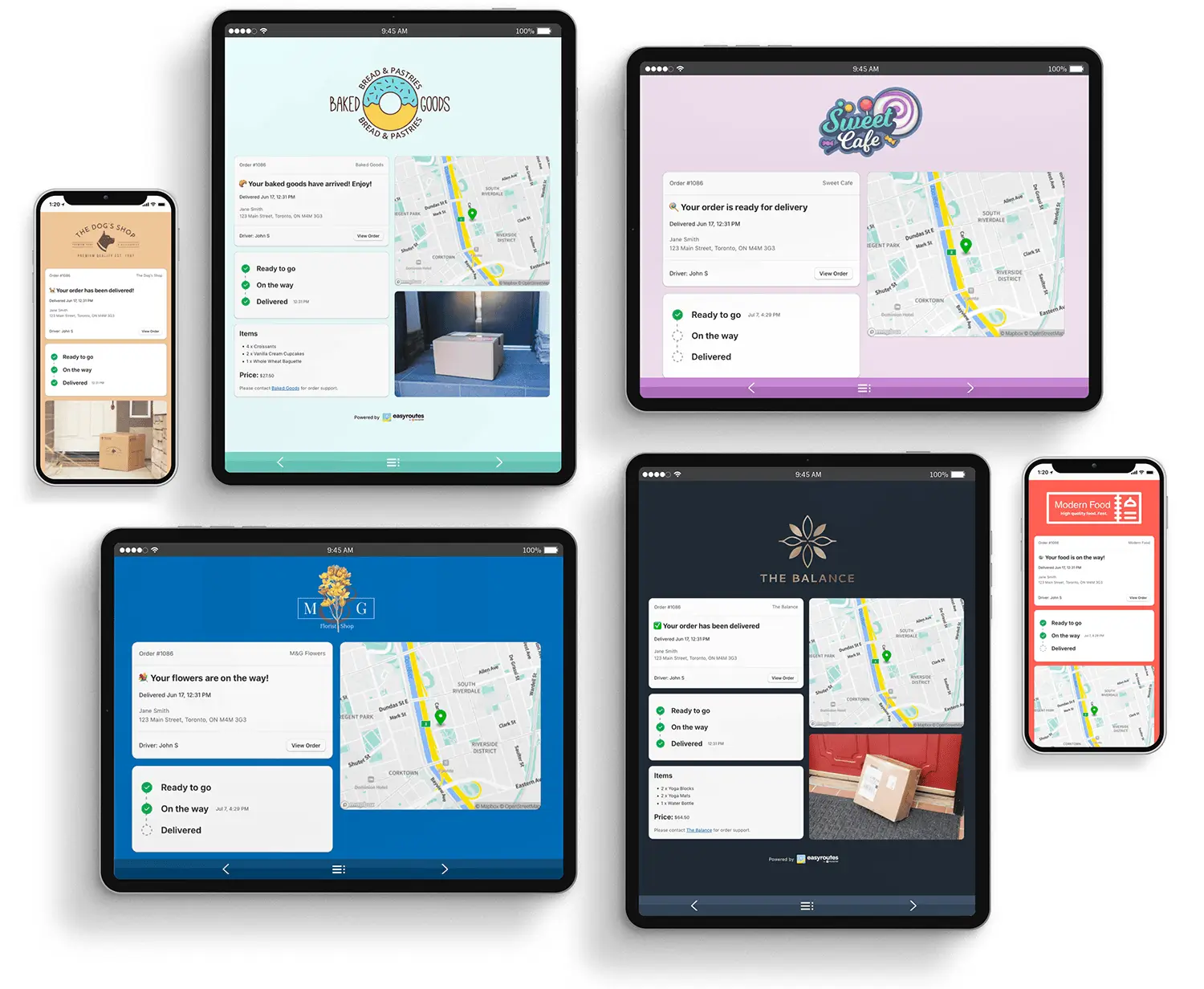
Customers feel the difference too. You can schedule routes in advance to calculate accurate ETAs for every stop, then keep recipients informed with branded email and SMS notifications for events like Ready for Delivery, Out for Delivery, Driver is X Stops Away, and Delivered. You control which events trigger a message and can match the wording to your brand voice. If a route slips to a new day or window, a rescheduled notification keeps customers in the loop proactively instead of leaving them guessing. Because so many gifts are time-sensitive, the ability to plan ahead and share scheduled deliveries with precise windows is one of the most valuable things you can offer on Mother’s Day. Selling perishables like fresh bouquets that need to arrive same-day? Our guide to same-day delivery covers how to pull it off without an Amazon-sized budget.
When a gift is meant to surprise someone across town, both the buyer and the recipient want reassurance it arrived. The EasyRoutes Delivery Driver app captures complete proof of delivery: drivers can take multiple photos, collect an e-signature, and leave a note about where the item was left. The photo link attaches to the order in Shopify, and you can even surface it on the customer tracking page or include it in confirmation emails so the gift-giver sees their bouquet safely delivered.
It’s a small touch that prevents big headaches — disputed deliveries, “it never arrived” messages, and anxious customers calling during your busiest hours. On a day when every order carries extra emotional weight, that visual confirmation is worth its weight in goodwill. For more on setting it up, see our breakdown of proof of delivery benefits and implementation.
A holiday spike is also a once-a-year audition in front of a flood of new customers. Get the delivery right and many of them come back for birthdays, anniversaries, and next year’s Mother’s Day; get it wrong and the disappointment sticks far longer than the sale. On-time arrivals, proactive tracking updates, and reliable proof of delivery are exactly the moments that build trust — and they cost far less than acquiring a brand-new customer to replace one you lost. Treat Mother’s Day not just as a sales event but as a chance to earn loyalty, and capture those new buyers into your email list or subscription offers while the goodwill is fresh. Our guide to what makes a great delivery experience lays out how the details add up.

EasyRoutes helps a lot of flower shops survive — and thrive through — their busiest weeks. Take Bloomen, a Canadian online florist. Flower delivery demands precise scheduling, and before EasyRoutes the Bloomen team was spending six to eight hours a week just planning routes. Once routing became fast and reliable, they were confident enough to bring delivery fully in-house by hiring their own drivers — turning a logistical headache into a competitive advantage, lower delivery costs, and a better experience for the customers receiving their flowers.
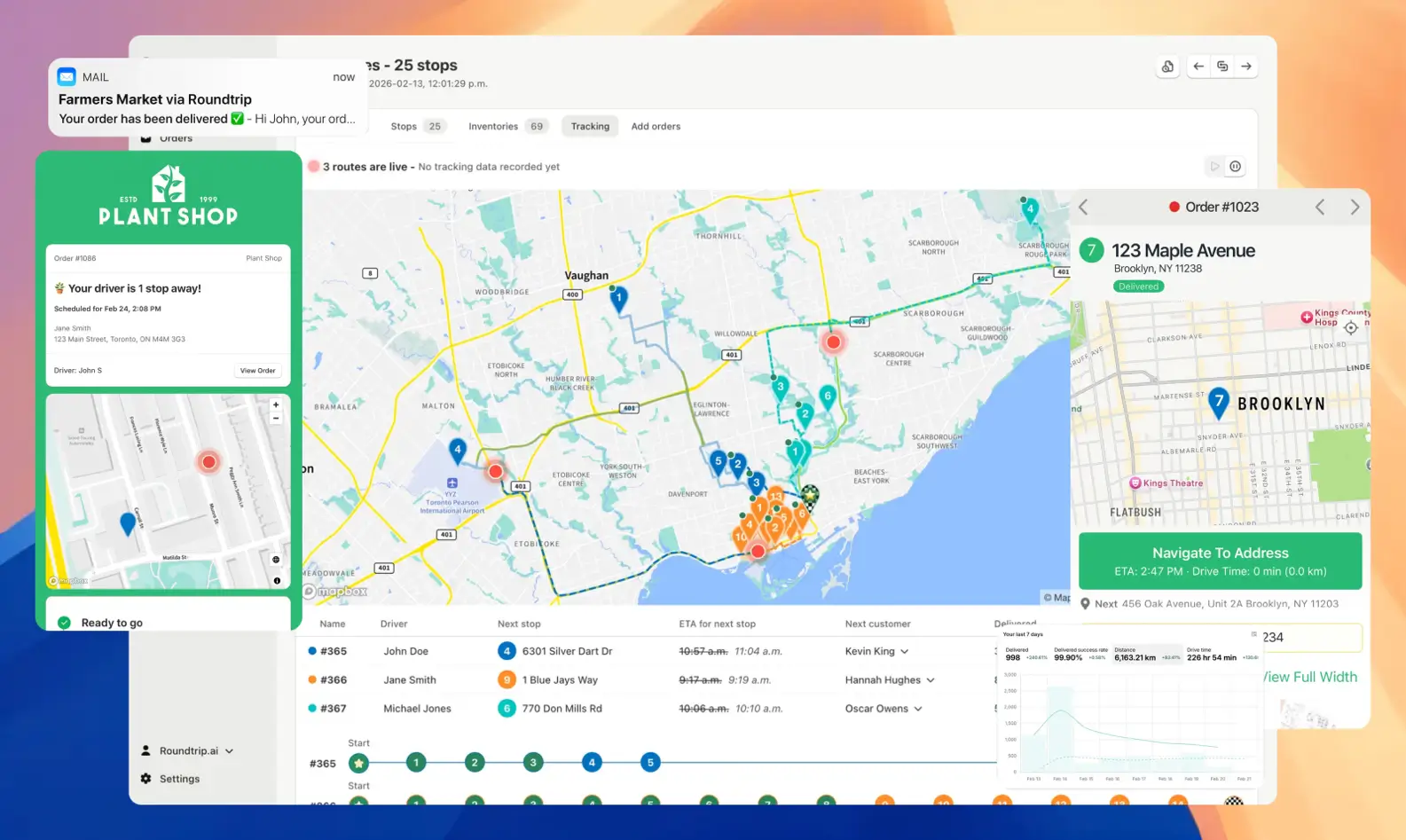
Mother’s Day demand isn’t going anywhere — if anything, it keeps breaking records. The merchants who come out ahead aren’t necessarily the ones with the most drivers or the lowest prices; they’re the ones who plan early, route smartly, communicate clearly, and prove every delivery. EasyRoutes brings all of that into one Shopify-native workflow so you can spend less time wrestling logistics and more time celebrating a record sales week. Start your 14-day free trial of EasyRoutes and make this Mother’s Day your smoothest yet.
Yes. Enable Balance routes to distribute stops as evenly as possible across multiple routes/drivers while respecting other route constraints (like time windows, or item/weight limits).
See: Balance routes · How many routes?
Yes. Add/remove stops, drag‑and‑drop stops to reorder them, change drivers or schedules, and re‑optimize at any time.
See: Edit Routes
Absolutely. Drivers can add photos, collect an e‑signature, and record notes at each stop; these appear in the route and customer tracking (if enabled).
See: Proof of Delivery
Yes. With the Premium plan and above, fully customize email/SMS: add your logo and colors, edit copy/variables, and choose which events send. Works for Shopify orders and imported/manual stops.
Yes. Schedule routes for specific dates/times, and ETAs will be calculated for each stop on a route. These ETAs can be shared via customer tracking links and email/SMS delivery notifications.
Yes. Assign routes to drivers directly, or share a self‑assign link so eligible drivers can claim routes. Drivers complete deliveries in the EasyRoutes Delivery Driver mobile app.
EasyRoutes is the AI-native delivery operations platform trusted by 5,000+ businesses across 75+ countries. Plan routes in seconds, dispatch drivers automatically, and delight your customers — from Shopify or any order source. Experience delivery operations that run themselves. Rated 4.8 stars and certified Built for Shopify.
⭐⭐⭐⭐⭐ 4.9 stars • Trusted by 5,000+ Businesses





