
We've added a new feature that automates common functionality when adding orders to routes.
Note: Order import automation is currently only available on EasyRoutes Premium and Enterprise pricing plans.
Access and configure these automated rules from your EasyRoutes Settings > General tab, under the Advanced order automation rules section:
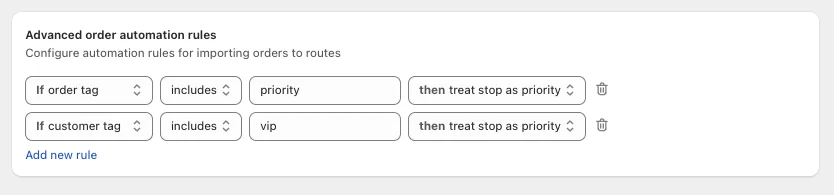
Automation rules are applied when orders are added to a route, either from the Orders page or on the Add Orders tab of an existing route or route group. See the Adding Orders support article for further details.
Supported fields
- order tag - if any tag on an order matches the condition, the outcome will be applied.
- customer tag - if any tag on the customer at the time the order was created matches the condition, the outcome will be applied.
Supported outcomes
- treat stop as priority - the resulting route stop for the order will be marked as priority.
Stay tuned to this page as we implement more automation fields and outcomes, or get in touch with the EasyRoutes team if there are any fields or outcomes that would be useful for automating your specific workflows.