Food Delivery for Restaurants & Meal Businesses
By Joe SnyderRun your own restaurant and meal delivery instead of paying third-party app fees — a guide to in-house delivery, route optimization, and EasyRoutes.
Run your own restaurant and meal delivery instead of paying third-party app fees — a guide to in-house delivery, route optimization, and EasyRoutes.
Food delivery has gone from a pandemic-era survival tactic to a permanent pillar of how restaurants, caterers, and prepared-meal businesses reach their customers. The convenience that diners discovered during lockdowns never went away — but neither did the steep fees that third-party apps charge to provide it. The good news is that running your own food and meal delivery is more achievable than ever, and for most operators it is far more profitable than handing 15–30% of every order to a marketplace. This guide pulls together everything you need to build an efficient in-house delivery operation: the market opportunity, the true cost of the apps, how to set up delivery, and the route optimization and software that make it all work.
The online food delivery market has matured into a global digital ecosystem, and it is still growing quickly. The sector is valued at roughly USD 284.7 billion in 2026 and is projected to reach USD 468.5 billion by 2031, an annual growth rate above 10%. That expansion is driven by busy households, near-universal smartphone use, and a lasting consumer expectation that almost any meal can arrive at the door within the hour.
For a restaurant or meal business, that shift is both an opportunity and a challenge. Direct-to-customer delivery can meaningfully grow revenue, but managing the logistics at scale — turning a flood of incoming orders into efficient routes, keeping customers informed, and getting food to the door while it is still hot or properly chilled — is hard to do well without the right tools. That is exactly the gap that smart delivery operations close.
When restaurants first needed delivery in a hurry, most turned to the big marketplaces. DoorDash now commands well over half of the U.S. food delivery market, with Uber Eats and Grubhub making up most of the rest. These platforms are excellent at one thing — putting your menu in front of people who have never heard of you — and they remain a useful discovery channel. The problem is what they cost once a customer is yours.
Third-party commissions typically run 15–30% per order, and once promotions, processing, and advertising fees are layered in, the effective cost often climbs toward 30–40% of the ticket. Set that against the reality that a typical independent restaurant runs on a 3–9% net profit margin, and the math becomes structurally impossible: the platform’s cut can exceed the entire margin on the meal itself. The marketplaces are best understood as customer-acquisition tools, not profit centers.
There is also a quieter cost. When a guest orders through an app, the platform owns the transaction, the contact details, and the order history — so you cannot easily build loyalty or market to that customer again. Diners notice the markups, too: roughly two-thirds of customers say they would order directly from a restaurant if the prices were the same. For a fuller breakdown of the major platforms, see our guide to the best food delivery services, and weigh the trade-offs in our comparison of in-house versus third-party delivery.
Bringing delivery in-house cuts out the middleman, letting you keep a far larger share of every order. But the benefits go well beyond commission savings. When you control the route from your kitchen to the customer’s door, you control food quality and the entire experience. A late order or food that arrived too hot or too cold gets blamed on the restaurant, not the courier — so owning the last mile protects your reputation as much as your margin.
In-house delivery also builds the direct customer relationship that the apps keep for themselves. Every order becomes a chance to capture contact details, encourage repeat business, and reinforce your brand. You do not have to abandon the marketplaces entirely; the strongest strategy is to use them for discovery and then steadily move repeat customers onto your own channel. Even shifting a portion of repeat orders in-house can recover meaningful margin over a year.

Adding delivery to an already busy operation can feel daunting, but you do not have to do everything at once. Start small, prove the model, and scale as demand grows.
Improving efficiency and lowering costs begins with the menu. A full menu raises food costs at exactly the moment you are trying to conserve cash, so pare it down to the items that are easy to prepare and that travel well. Pizza holds up beautifully on the road; delicate plates of steak or seafood are harder to get right. That does not mean a fine-dining kitchen is out of luck — it just means focusing on a few dishes you can deliver flawlessly. Some operators take this logic all the way to a separate delivery-only concept; our guide to ghost kitchens walks through that model in depth.
While trimming the core menu, consider adding items built specifically for at-home dining. Family-style meals and larger bundles suit households ordering together, and beverage add-ons can recover the drink sales you lose without a dine-in room. Meal kits are another strong option: package the ingredients and simple instructions for a few of your most popular recipes, and customers get both a great dinner and an activity. Restaurants that depend on recurring revenue should look at turning these into a standing offer — our piece on switching to a subscription model covers how prepared-meal subscriptions create the predictable order volume that makes delivery routes efficient.
You rarely need to hire from scratch. Underutilized staff — servers, bartenders, bar-backs — already know your brand and your standards, and they can do what they do best (customer service) out on the road. You do not need a full fleet on day one; start with a couple of drivers and grow capacity as orders climb. Finally, spread the word: flyers in your dine-in room, social posts, and email to your subscriber list all keep your delivery service top of mind the next time someone wants a meal brought over.

Efficient routing is the backbone of profitable delivery. The difference between a hand-drawn route and an optimized one shows up directly in fuel, labor, and the number of orders a driver can complete in a shift. Academic research on communal fleets found that route optimization can cut fuel use and the resulting emissions by up to 20% — savings that compound on every run.
Modern routing software turns a list of the day’s orders into the most efficient sequence of stops in seconds, accounting for traffic, delivery windows, and vehicle capacity. Instead of a dispatcher squinting at a map, the system increases the number of stops per mile, which lowers the cost per delivery faster than almost any other operational change. If you are new to the concept, our explainer on what route optimization is covers the fundamentals and the trade-offs.

Investing in dedicated delivery management software streamlines everything from order intake to the final hand-off. The right platform integrates with your existing systems — for a Shopify store, that means orders flow in automatically (see our Shopify local delivery guide) — and replaces a stack of manual tasks with a few clicks. As you compare options, prioritize these capabilities:
Beyond the software, a few operational habits separate smooth delivery programs from chaotic ones:
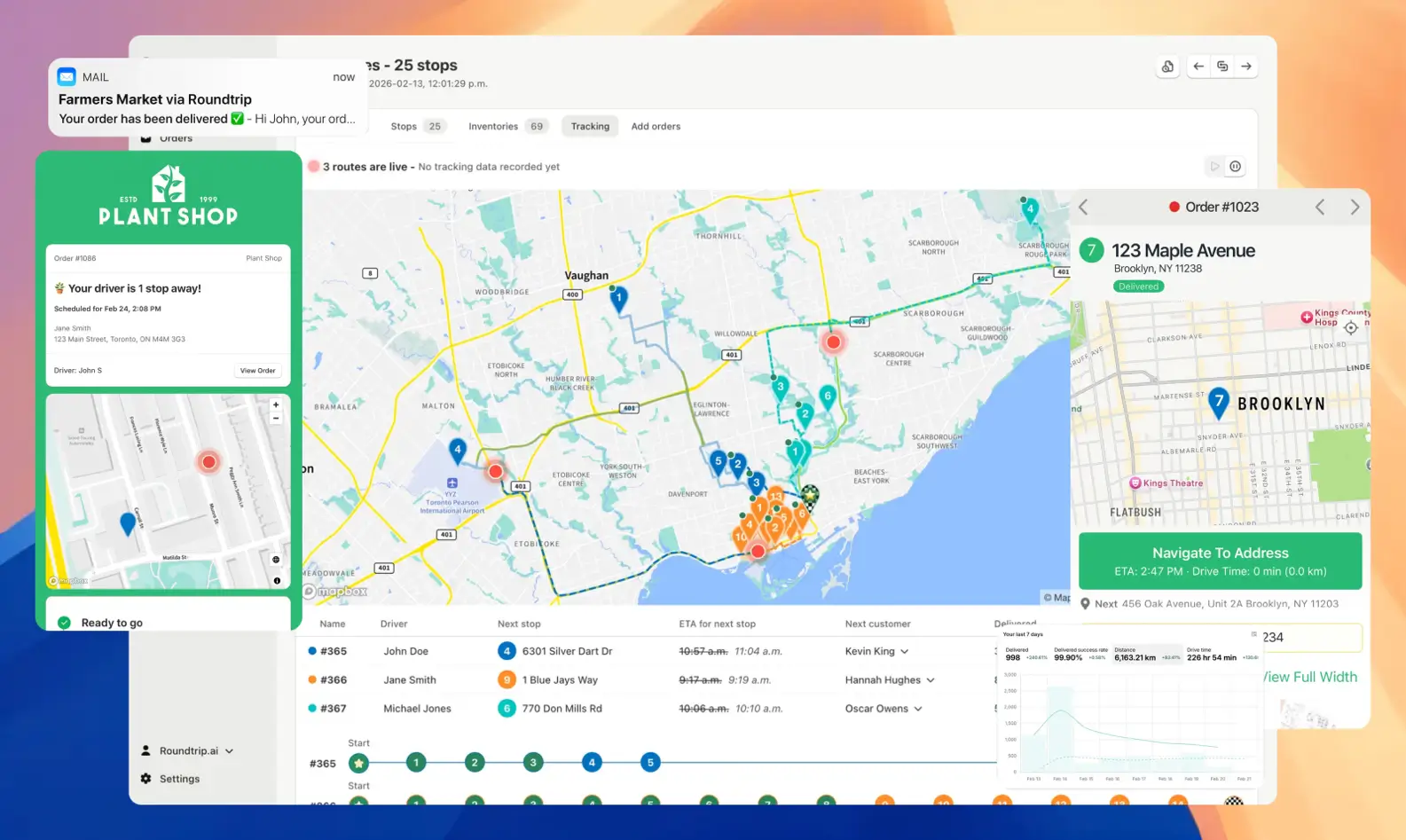
EasyRoutes was built so that even a single local restaurant or prepared-meal service can run deliveries like a pro. Because it integrates directly with Shopify and your orders, you simply select the day’s deliveries and EasyRoutes calculates the most effective routes, which you can dispatch to drivers’ phones in minutes. Here is what makes it a smart, low-cost alternative to the marketplaces:
The bottom line is the same one that helped operations like the Uproot Food Collective scale their own delivery: owning your routes lets restaurants, caterers, and prepared-meal companies cut costs, lift profits, and deliver a better experience than a marketplace ever could.
Food and meal delivery is no longer optional, but how you deliver is a choice with real consequences for your bottom line. Leaning entirely on third-party apps means surrendering margin, data, and control on every order. Building an in-house operation — a streamlined menu, the right drivers, and software that handles routing, tracking, and proof of delivery — keeps all three where they belong: with you. Start small, optimize relentlessly, and let technology do the heavy lifting.
Ready to run your own delivery without the marketplace markup? Try EasyRoutes free on the Shopify App Store, or create an account on EasyRoutes' standalone web app, and turn your orders into optimized routes today.
EasyRoutes optimizes deliveries using your selected orders, start & end locations, stop time intervals, time windows, and route limits. You can balance routes, respect capacities, and re‑optimize as plans change.
See: Route Options · EasyRoutes 101
Yes. EasyRoutes supports Vehicle Profiles you can configure and assign to routes. EasyRoutes also supports capacity planning via item or weight limits per route. Use these with other options (like time windows, or custom start/end locations) to keep plans realistic and drivers on schedule.
See: Vehicle Profiles · Max items/weight per route · Commercial/GPX Export
Yes. Schedule routes across multiple days with configured start times/locations and add an overnight driver break to maintain accurate ETAs.
See: Multi‑Day Scheduling
Yes. Automate with Workflows to create routes on a custom, recurring schedule, or duplicate prior routes and re‑use their settings/stops in just a few clicks.
See: Workflows · Duplicate routes
Yes. EasyRoutes Premium and Enterprise plans support branded SMS notifications with usage‑based pricing per message segment. Configure templates and funding in Settings.
Yes. On Premium/Enterprise plans you can display a live driver pin on tracking pages when the driver is 1–10 stops away.
Yes. Schedule routes for specific dates/times, and ETAs will be calculated for each stop on a route. These ETAs can be shared via customer tracking links and email/SMS delivery notifications.
EasyRoutes supports delivery photos, e‑signature, driver notes, and automatic timestamps (with GPS location when available) to provide a complete delivery record.
See: Proof of Delivery
Yes. Assign routes to drivers directly, or share a self‑assign link so eligible drivers can claim routes. Drivers complete deliveries in the EasyRoutes Delivery Driver mobile app.
Driver seats are active licenses you assign to people in your driver roster. Activate a seat to let a driver receive routes in the EasyRoutes Delivery Driver app; deactivate a seat to pause access without deleting their profile. You can toggle seats anytime and only pay for the seats on your plan at that moment. Charges/credits are prorated automatically when you add or remove seats.
Pricing is based on plan tier plus the number of driver seats in your subscription; optional SMS is usage‑based. Scale seats up/down anytime.
See: Pricing · Pricing & Plans FAQ
Yes. EasyRoutes for Shopify and EasyRoutes for Web include a 14‑day free trial on any tier, so you can test our advanced features before subscribing.
See: Plans & Pricing
Yes. EasyRoutes supports Shopify Local Delivery and can include Pickup orders on routes when you need a driver or staff task at your store or pickup point. Local Delivery instructions appear directly on the stop when available.
EasyRoutes is the AI-native delivery operations platform trusted by 5,000+ businesses across 75+ countries. Plan routes in seconds, dispatch drivers automatically, and delight your customers — from Shopify or any order source. Experience delivery operations that run themselves. Rated 4.9 stars and certified Built for Shopify.
⭐⭐⭐⭐⭐ 4.9 stars • Trusted by 5,000+ Businesses





