
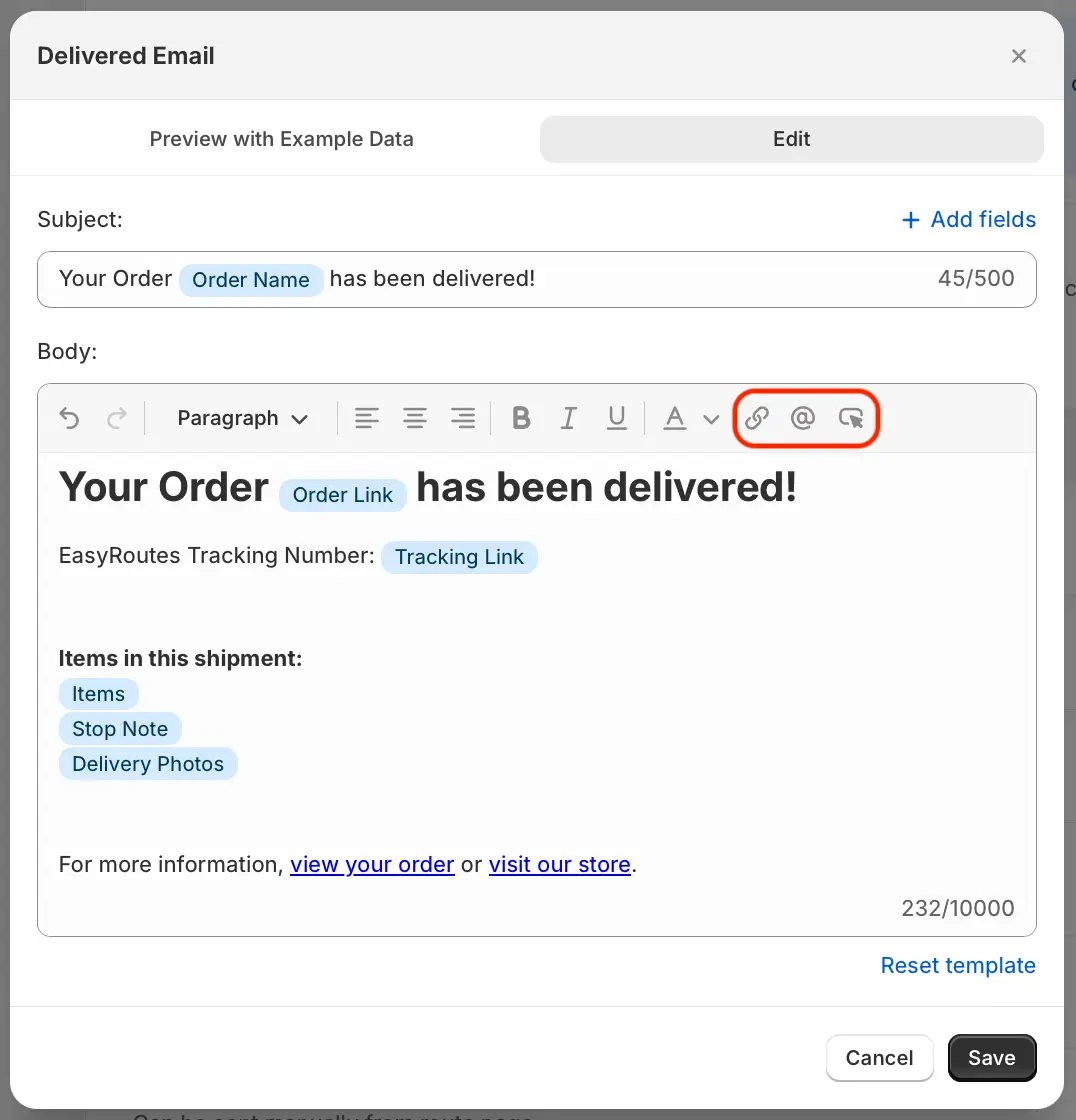
We've released a number of updates to EasyRoutes' email notification templates, with more options for providing a modern and customized experience when communicating with customers via email. Each of the template types has been re-designed to reflect modern email standards and to better showcase user logos, branding, and colour preferences.
The template editor (shown above) has also been updated, giving users a broader set of options for customizing text formatting and including dynamic variables pertaining to deliveries. Three new tools (highlighted above) give users quick access to insert and format hyperlinks, dynamic order variables, and custom buttons directly within the email body.
Users can enable these new email templates from their EasyRoutes Settings > Customer Notifications tab, by selecting the Modern option from the Email template dropdown menu in the Branding section. Once enabled, individual templates for each delivery event can be previewed and customized by clicking each event's title within the Notification templates section on the same page.
Any existing customizations to legacy email notification templates remain enabled by default, and can be accessed or updated via the Minimal option from the same EasyRoutes Settings page mentioned above. For full details on working with EasyRoutes' email notifications, see this support article.