Changelog
Here are the latest product updates from EasyRoutes. If you have feedback or suggestions, please reach out — we'd love to hear from you!
Here are the latest product updates from EasyRoutes. If you have feedback or suggestions, please reach out — we'd love to hear from you!
Version 1.0.97 of the EasyRoutes Delivery Driver mobile app is now available to download for iOS and Android devices. This release patches an error affecting a small subset of iOS users when attempting to save eSignature proof of delivery captures; users not affected by this error should not experience any other impact when interacting with the app compared to the previous version.
Version 1.0.96 of the EasyRoutes Delivery Driver mobile app is now available to download for iOS and Android devices. This release features updates to the app's phone number validation library to support a broader range of Australian area codes, as well as further improvements to app logging behaviour and minor bug fixes. Users should not experience any noticeable impact when interacting with the app compared to the previous version.
Version 1.0.94 of the EasyRoutes Delivery Driver mobile app is now available to download for iOS and Android devices. This release features more robust support for logging throughout the mobile app, as well minor bug fixes and performance improvements. Users should not experience any noticeable impact when interacting with the app compared to the previous version.
We've added two new endpoints to interact with your EasyRoutes stops & routes using our native APIs:
We've also consolidated all API reference materials, resources, and code samples into the new EasyRoutes Developer Docs Portal. All current and future documentation on getting started with the API, authentication protocols, and working with our API endpoints & webhooks can now be found here.
Looking for something else in the API? We're always eager to hear about custom solutions using EasyRoutes' APIs - please get in touch with our team and let us know of any additional API functionality that would be useful to your workflows.
Version 1.0.93 of the EasyRoutes Delivery Driver mobile app is now available to download for iOS and Android devices. This release features support for the previously announced start/end location photo upload requirements, as well minor bug fixes and performance improvements.

We've added two new EasyRoutes settings, allowing route planners to require photo uploads for route start and/or end locations - particularly useful for users comparing mileage, vehicle conditions, or total route contents both before and after a route is completed. When enabled, drivers will not be able to start their delivery routes and/or mark routes as completed until configured photo upload requirements are met.
Enable this new behaviour from your EasyRoutes Settings > Driver settings tab, using the two checkboxes in the Driver app settings section highlighted above.
Drivers will also need to update their version of the mobile app to v1.0.93 or above in order for either of these new settings to take effect.
We've introduced several new endpoints to interact with your EasyRoutes stops, routes, and drivers using our native APIs:
For more details on configuring and working with each of these new EasyRoutes API endpoints, refer to the support documentation linked to each of the endpoint titles above.
We've also made some improvements to existing API behaviour, including:
Full details, sample responses, and reference documentation for working with our API can be found in the Developers / API section of the EasyRoutes support portal.
Version 1.0.92 of the EasyRoutes Delivery Driver mobile app is now available to download for iOS and Android devices. This release features additional enforcement logic preventing proof of delivery attachment removal from stops marked as completed or attempted, as well minor bug fixes and performance improvements.
.webp)
We've launched an additional set of translations for the EasyRoutes Delivery Driver mobile app, which will be automatically applied for users with their primary device language configured to Dutch or German. All in-app functions - including buttons, labels, notifications, and settings pages - will now automatically translate to match either of these device languages, in addition to the previously announced French and Spanish translations.
Drivers will need to update their version of the mobile app to 1.0.91 or above in order to access these two new automatic app translations. For more details on translating customer-facing communications (including email notifications, tracking pages, and packing documentation) to match your store's language preferences, see this support article.
Version 1.0.91 of the EasyRoutes Delivery Driver mobile app is now available to download for iOS and Android devices. This release features support for automatic Dutch and German app translations, as well as minor improvements and bug fixes.
Note: Drivers will need to update to the latest version of the app (v1.0.91 or above) in order to take advantage of these two new automatic app translations and overall improvements within the EasyRoutes Delivery Driver mobile app.
We've made a series of adjustments to the EasyRoutes admin interface to provide a more seamless experience when working across the app. As a result, some EasyRoutes functions have moved to a new location or received an updated visual treatment.
When selecting orders/stops using the checkboxes on the Orders and Routes pages, the Actions menu (which previously appeared at the bottom of the page) has been moved to the upper right-hand corner of the table. This change affects Add to map functionality (as shown below) as well as any bulk order/route actions across the app:
.webp)
On the Orders page, orders that have already been added to the map now display with a shaded background to indicate this, like #1149 and #1145 below:
.webp)
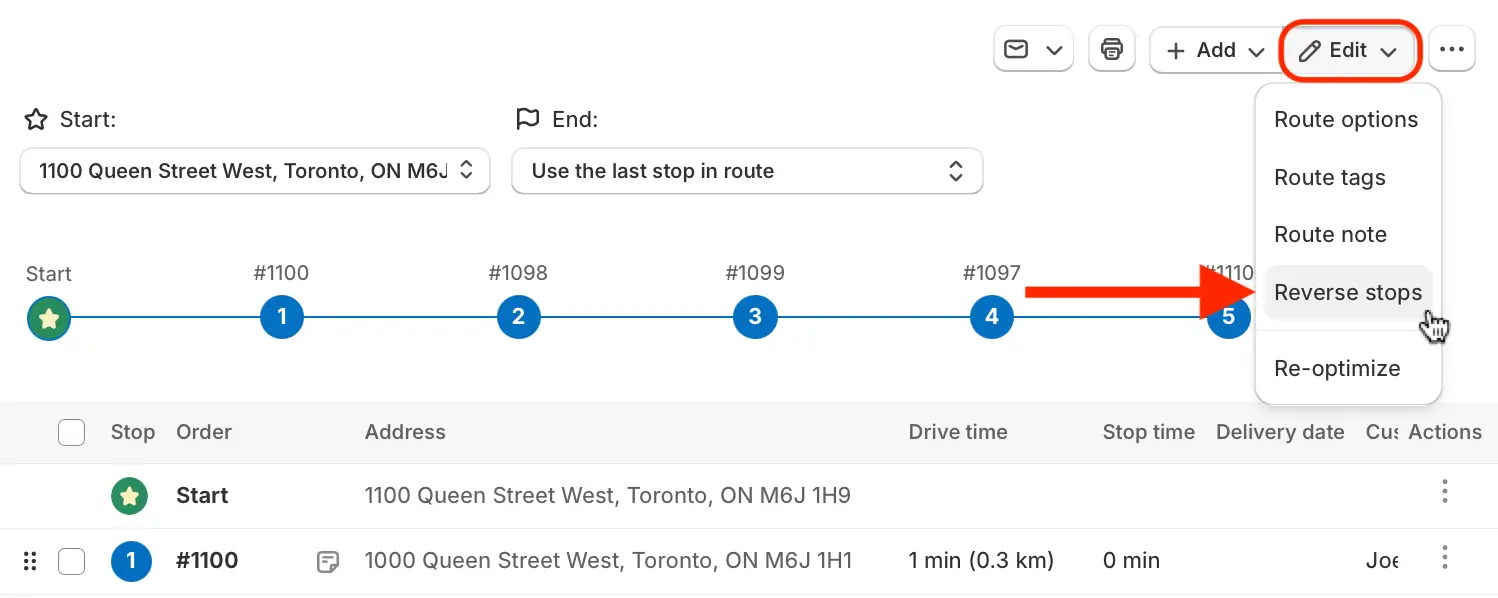
The Reverse stops button/function (previously found above the table checkboxes on a Route page) can now be found in the Edit menu when viewing any route:
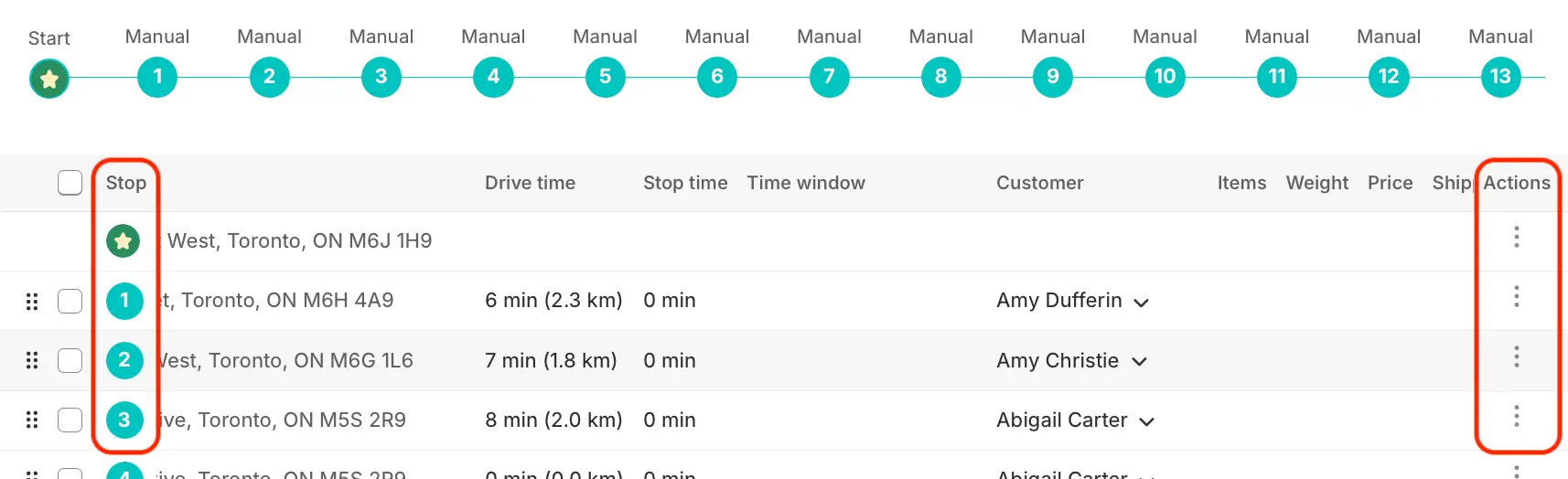
The Order column (on the Orders page), as well as the Stop column and Actions column (on Route pages) are now "sticky" and will remain on screen when scrolling horizontally across these tables, increasing clarity and accessibility when working with wide tables:
Similar to the Orders & Route pages, when using the checkboxes to select drivers on the Drivers & Vehicles page, the Actions menu (used to activate, deactivate, or delete drivers) has shifted from the bottom of the page to the upper right-hand corner of the Drivers table:
